
- Training
- Service
- Promotion
- Schedule
- Testing Center
- News
- Contact
7/12/2022


Bottom Line: Learn the most common error with XLOOKUP and how to fix it.
Skill Level: Beginner
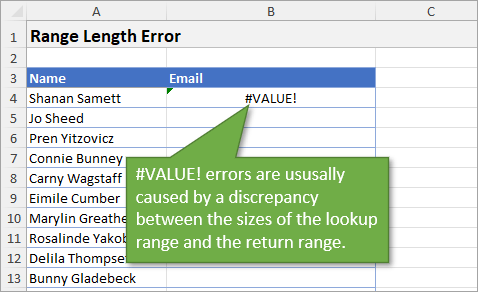
When working with XLOOKUP functions, there are two main errors that I've encountered, and both can be avoided using the same solution. Let's look first at the #VALUE! error.
When you see a #VALUE! error in your XLOOKUP function, the most likely reason is that your lookup array and your return array are not the same size.
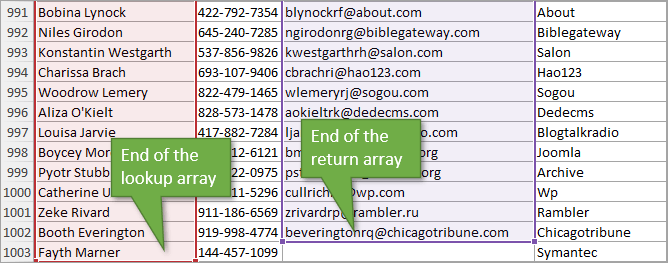
In my example, the reason the arrays are different sizes is that there is a blank cell at the end of my return array. When I wrote the formula, I used the Ctrl + Shift + ↓ shortcut to jump to the end of my column, and that last blank cell wasn't part of the selection.
As you can see, my lookup array ends with row 1003 while my return array ends with 1002.
Before we talk about a solution, let's look at another error you might encounter: the Absolute Reference error.
This error isn't indicated by a # prefix. It's noticeable from mistakes in the returned results.
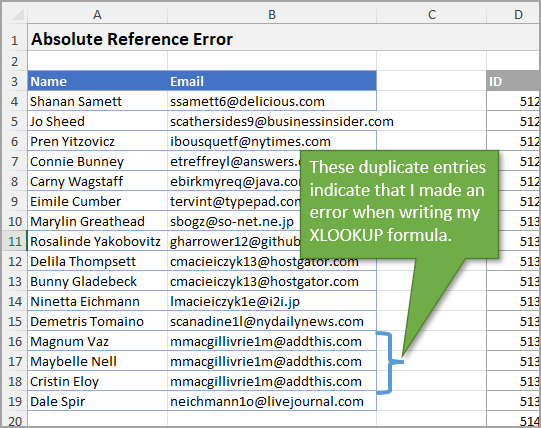
The reason for the error is that I forgot to hit F4 to make my values absolute when I wrote my XLOOKUP function. This can happen when writing either the lookup range reference or the return range reference, or both.
The solution for both of these errors lies in making your data set into an Excel Table. By using an Excel Table, your columns will always be the same size and your references will always be absolute.
To change a table into an Excel Table you can use Ctrl + T or use the Format as Table button on the Home tab of the Ribbon.
Once your data is converted to an Excel Table, you can use the keyboard shortcut Ctrl + Space to select the entire column when writing your lookup formula.
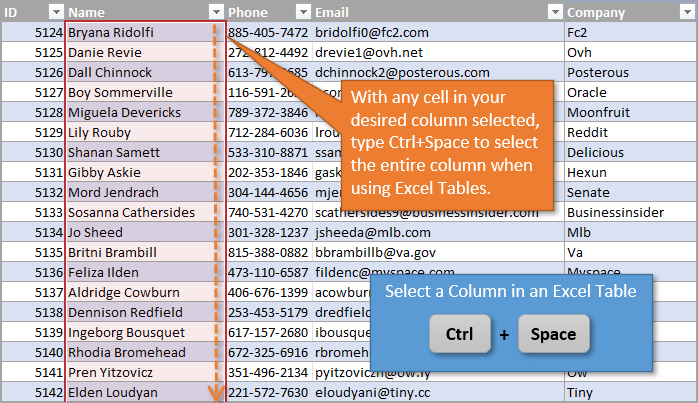
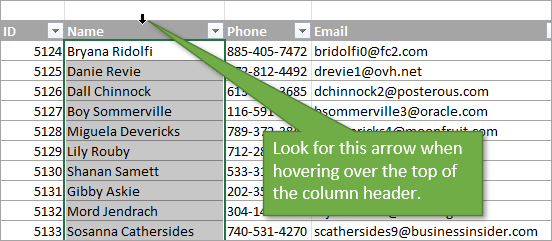
If you prefer to use your mouse instead of a keyboard shortcut, you can hover your mouse over the top of the column header until your cursor becomes a small down arrow. Then left-click to select the column.
Source: excelcampus.com

12/11/2025


